Showing posts with label Josh B. Show all posts

Friday, 8 July 2016

R.I.P Zaption


And it's finally happened......

With the huge number of companies offering free digital tools in the online education space, many of
which offer paid premium versions, it was inevitable that at some point one would fail.

Sadly it is Zaption, the interactive video creation tool, a product that more often than not made the top of many teachers most useful tools lists.
Zaption hasn't failed as such, but been acquired by Workday, a large player in the HR and Corporate training industry. Workday it seems, agrees with educators that Zaption is a great technology and offered the company enought money for them to sell. Rather than share it with the world, Workday has made the decision to shut the stand alone service down so it can incorporate Zaption's features into its own product.

This is certainly a blow for the thousands of teachers that have developed content for Zaption and all the more harsh given that Workday will not continue to support existing Zaption Tours. As of 30 September Zaption will disappear.


What does this mean for those of you with Zaption tours as resources your courses? The short and tough answer is you will lose your work.

Looking forward, there are a couple of great alternatives that are available, Playposit and EdPuzzle being the two leading contenders. The TEEL Team will be comparing these two services over the coming fortnight and will report back on the pros and cons of each. Stay tuned for our take on the best approach for creating interactive video in the post Zaption era!


Tuesday, 31 May 2016

Blurring the Lines of Reality - 2016 Update


I was fortunate to attend Magnify recently, a two day Virtual and Augmented Reality conference hosted as part of Auckland Tech Week. Although focus was directed at the entertainment, media and marketing sectors with speakers like Academy Award winning stunt coordinator Guy Norris from Proxi VR, Ian Taylor from Animation Research, and New York advertising heavyweight Catherine Patterson, responsible for Dell Computers Golf the City AR campaign, I came away with plenty of ideas how this technology can benefit the eduction sector.


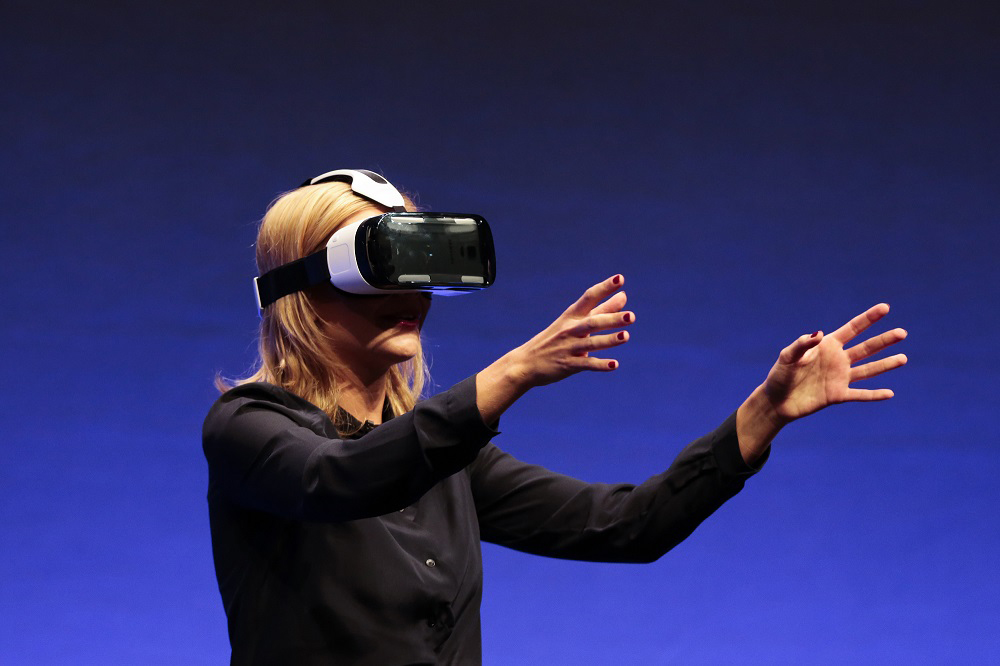
Vendors had plenty to show off. Nokia was unveiling its $100,000 Ozo professional VR camera and at the consumer end of the market Samsung's Gear 360 Camera and Headset could well be this Christmas's Hoverboard. To experience being inside a cinematic movie experience courtesy of Proxi VR film technology, where action is taking place all around you rather than in front of you and actors communicate to you as if you were actually in the scene is an unreal experience. 


Immersive technology is seen by those in the know as crossing over into the mass market this year.  There are big clues as to what is becoming possible for us in the education sector. True VR is still out of reach to most institutions but experiences such as the Quake History Demo developed by New Zealand company Sensorium, demonstrate the educational possibilities this technology will offer. 

YouTube, Vimeo and "visual expressionist" kings GoPro now support 360 video (to experience this, watch the example videos at the bottom of the post) and with Samsung investing heavily in consumer products, like it or not, the flood of user generated content is almost upon us. With its applications ranging from advertising, media, tourism, medicine real estate...... and yes education, VR and AR is being touted as a significant new development.


Quake History Demo from Sensorium VR on Vimeo.

Its easy to come away from an event like this and think that there is no way this will happen in education. Think again. It wasn't long ago that the idea of filming your own video resources and posting them online seemed like science fiction. AR and 360 video technology will appear first. Products the Gear 360 put surround video production in the hands of anyone and software like Aurasma assist with AR content and is already being used in schools. Stay tuned for the first AR resources coming to Waiariki Bay of Plenty Polytechnic in the next few months.


Here are three quite different examples of 360 degree video. I particularly like the Chernobyl example as it skilfully incorporates historical footage into the ruins of the former Soviet nuclear power station.

360 Degree Tornado - use the arrow controls to navigate around, or even better download the latest version of the YouTube app and watch on your phone


Primary School Age 360 Solar System Tour


360 Chernobyl Documentary Trailer


...... and as a first day of winter bonus - an amazing video of the soon to be released Omni from GoPro. Click here

Friday, 22 January 2016

Three Ways to Ask a Question


Great teachers understand the importance of feedback as part of effective teaching and learning. Feedback allows teachers to check understanding, get a sense of student opinions on a topic and encourages decision making. Feedback contributes to stimulating, lively learning. One way to get feedback is with a great question and in this post we look at three different ways to do just that - ask a question.


Hands Up

The tried and true approach since Grandma was a preschooler, hands up is great for all sorts of reasons, but may not give the most accurate responses. Students are inclined to vote with the majority, or at least with the first responders, and quieter students may not want to vote against the majority even though they are confident in their own answer.  If the question is based on a sensitive issue or involves students publicly identifying their personal beliefs, some may not feel comfortable displaying these in a public setting.

Clickers 

Clickers, which were all the rage a few years ago, and more recently polling software such as Poll Everywhere, can be feature filled and flexible, especially if class sizes are large (100+). The one major downside of clickers and polling software is that they rely on every student having either a clicker or mobile device. "My clicker's battery is flat", "I can't connect to the internet", What's the web address again?"..... you get the picture.

Plickers - Better than Clickers? 

Enter a really cool tool called Plickers,  the 2106 iteration of tech based mass questioning solutions. Yes, it has its limitations, but it certainly ticks many boxes for ease of use and practical features. Put simply, it's a polling tool that uses hand held QR codes and the teachers mobile device.

Why do we like it? Several reasons...

It's a low tech, high tech solution. Students do not need a device. Simply hand each student a printed QR Card from the free downloadable PDF on Plickers website.

Its flexible - Set up classes and questions prior to your lesson, or create them on the fly. Responses can be anonymous or tagged to individual students. Questions can be one-off or part of a running record. Results can be graphed, tabled and exported.

It's fun - Use it for assessment or just to add some competition to your class. You can display the results instantly, letting your class see how individuals answered, either anonymously, or if appropriate, by name.

It's Free!

How do you use it?
Hand out a QR card (they come as set in PDF form) with four response options on it to each student in class - get the students to hold the card up oriented on what answer they choose - scan the class with your mobile device using the free Plickers app - watch the responses get recorded on the screen as you go.

If you want to know more about this great tool, come over to The Qube and ask for a quick demo from one of the TEEL's or keep an eye out for upcoming workshops later this month.


Friday, 2 October 2015

Data, Data and Storing it in The Cloud


Our ever expanding personal libraries of documents, photos, videos and music has resulted in an exponential increase in the amount of data we store. In Part One, we looked at the history of computer storage. Today, more and more individuals and businesses are choosing to store this content somewhere other than their personal computer, hard drive or phone 

Dropbox, Google Drive, iCloud, OneDrive; the names are familiar and they essentially all do the same thing - store files remotely for you. Add in social networks like Facebook, Instagram and YouTube for photo and video storage and you the have potential for a significant amount of your data being stored in "The Cloud" 

No, your files are not orbiting somewhere in the stratosphere, but stored on enormous facilities full of hard drives spread around the world in what is a global scale computer network connected by the internet. In essence, you files are sent along a pipe, and filed on someone else's hard drive, then backed up on other hard drives in different locations around the world. If you have an active internet connection you now have free (or very cheap) data back up solutions available to you. 

 But hang on, is my data safe if I store it in the Cloud? 

The simple answer is yes. Sort of. Everything is hackable and nothing is breach proof, however if you follow standard precautionary rules like choosing credible providers and using strong passwords you are much less likely to lose data than by using home grown methods. After all, rates of personal data back up is very low. We've all been there - laptop gets left on the bus, flash drive gets put through the wash, or phone falls down the toilet and you don't have a backed up copy of that important presentation or precious photo. Syncing your data with a cloud solution can avoid these potentially painful experiences, not to mention making your files more accessible when you are away from your computer.

The investment in storage and security by big players such as Facebook and Google in security and infrastructure is vast. As an example Google has a dozen data centres around the world, containing an estimated 900,000 servers using 260 million watts of power. Facebook's most recent facility pictured below (note the trucks for scale) is built on the edge of the Arctic Circle in Sweden, in an attempt to keep energy usage lower. Amazon is currently building a similar facility in remote Northwest China for the same reason. All those targeted advertisements on web pages and in your Facebook feed are there in part to pay for this infrastructure.


It is estimated that 2016 will be the year that a mind-blowing one Zettabyte of data will be stored online, that's enough for a 22 billion year long music playlist and remembering Moores Law this amount will only continue to rise.

So whats next? In part three we look at streaming services and productivity in the cloud and answer the question, how much data fits into the human brain.

Tuesday, 22 September 2015

Data, Data and Where to Store It.

Part One - The History of Data Storage.


Since the time when computers became a significant part of our lives, the need to save and move data has existed. In the first installment of this three part series, we take a look at the history of removable data storage.

Prior to the invention of the floppy disk in 1971, computer storage existed in several mediums
including punch cards, magnetic tape and even rope. The original floppy disk made it possible to move data easily from one computer to another and on release had a grand total of 80KB of memory, enough data for a ten page word processed document or approximately 1% of a modern digital photo file. Floppy disks went through various iterations in physical size and capacity over a twenty year period and maxed out at 1.44 MB of storage before newer technology superseded them.

In 1987 (Walk Like an Egyptian anyone?) Toshiba invented flash storage, a new type of technology that uses printed circuit boards rather than spinning disks to store information. It wasn’t until the turn of the century though, when personal computers began shipping with USB ports, that removable flash storage in the form of thumb drives became widely available. Although expensive in its infancy, flash storage is now cheap, reliable and has enormous capacity compared to its floppy predecessor. 

In keeping with Moores Law that suggests computing power doubles every two years, Samsung have just revealed a flash drive with 16TB of capacity, enough for over 1000 HD copies of the entire Star Wars Series (or about 16000 HD episodes of Game of Thrones if that's more your style). Most recently, with the adoption of smartphones, cameras, GPS, etc, flash storage is everywhere in the form of SD cards. While other storage mediums like CD ROM have come and gone, flash, with its tiny size, large capacity, high speeds, 10,000 write cycles and great reliability have meant we've come a long way since the humble floppy disk of 40 years ago and it would be unusual for a person to not use flash storage in some form in a typical day. As always with all technology however, even a 16TB flash drive will soon be obsolete. Tech companies Intel and Micron are working on a new type of storage called 3D XPoint that is 1000 times faster than flash and ironically shares some concepts with the 1960's rope storage technology that was used on the Apollo Space Mission.

So where to next?

In part two we examine cloud computing and why Facebook is building data storage facilities in the middle of ice fields.

Wednesday, 26 August 2015

The Increasingly Blurred Line of Reality.


The idea of Virtual Reality (VR) is not new, in fact the first VR machine, The Sensorama was invented way back in the digital Jurassic of the 1950's.
Those of you lucky enough to grow up in the pre-digital era will remember arguing with siblings over who got to watch Disney cartoon strips through the awesome Viewmaster, who's early versions pre-date the Sensorama and will be relaunched later this year based on Google's $25 Cardboard VR headset. And of course lets not forget the universe was saved from the forces of the Dark Side by an imploring Princess Leia hologram to Obe Wan Kenobi.

So what's VR got to do with education?

In some fields of study, it will be truly game changing. At Case Western Reserve University for example, the Medical Faculty is using new Microsoft technology called Hololens. Not only can anatomy students project a human body in front of them, they can use hand movements to interact and manipulate the hologram. Think Chemistry students inside a virtual atom, Automotive students studying an engine with specific parts removed, Architecture students developing 4D buildings and doing walk throughs as not so unrealistic future examples.

To see Hololens in action, take a look at the video below.


With heavyweights like Microsoft, Google and Facebook (who bought startup VR headset maker Oculus Rift for $2 billion earlier this year) all developing VR hardware, expect to see this technology trickle into educational, industry and entertainment applications in the very near future.
For your own completely free VR like experience download this app from VR company DAQRI (iOS and Android versions available). . Follow the instructions and be amazed.